Get a Quick Law Degree at Mass. School of Law
The legal community always abounds with discussion about changing the law school format. However, the current three year post-graduate path to a J.D. seems to be fairly well set in stone, until now.
It seems that the Massachusetts School of Law in Andover, Mass. is attempting to open their own undergraduate college. If successful, the school would allow students with a high enough GPA to start law school after their junior year of undergrad. The effect: a J.D. in 6 years, not 7. Robert Ambrogi has more on this, here.
I think this is an interesting concept, but I question a couple things about it. It could be a great productivity boost (hence, that’s why I’m writing about it). However, can’t people get this same effect by plowing through their undergraduate degree in three years? That isn’t a terribly uncommon thing to do. This method also prevents students from being locked into the same school for college and law school. And it ensures that students are getting the benefit out of all of their undergraduate classes.
The other point I question is the GPA cut-off line for starting law school early. In my humble opinion, a 3.2 is not a terribly high GPA, especially when using it as a line in the sand for people who can move up to the challenge that law school presents. I’m not sure what it would take to earn a 3.2 at Mass. College of History and Law, but perhaps the planners should draw up a bit more stringent requirements for their early law school program.
Do you have any thoughts on making the legal education process more productive? Feel free to post a comment or drop me a line.
[tags]law school, law, massachusetts, massachusetts school of law[/tags]
Get more legal tips
|
See also... |
Using Technology in the Courtroom: Are You Backed Up?
Over at Digital Practice of Law, the author references an article discussing the “Do’s and Don’ts of High-Tech Trial Presentations,” courtesy of Law.com. My favorite mistake, as cited in the article is people who don’t have a backup plan:
8. No backup plan. Courtroom technology is reliable, but accidents and equipment malfunction can and will occur. If you have a long trial, you may be allowed to fix the problem during a recess. But if you have a short trial or a tight trial schedule, you may be required to immediately go to plan B. If you are presenting evidence from a laptop, be sure you have a backup laptop and backup external hard drive with the same files. If you are providing a projector, make sure you have a spare bulb.
I think it is important to note that the “no backup plan” mistake can happen to anyone, anytime, anywhere. Factor in technology, and the risk increases. Add in a high-stakes trial (or any trial, for that matter, since you have to make money, right?), and you have a recipe for disaster. This all goes back to my point about making sure you have an appropriate backup plan. If you plan for the worst, you’ll be sitting pretty if something bad does happen.
Something even more important to remember is that a crisis can strike outside the courtroom. What about that important presentation you’re giving at your firm’s Litigation Section meeting? How about the paper you are presenting on campus next week? Yep, techno-crises can happen anywhere. The best method is to be like a Boy Scout and “Be Prepared!”
I would add one suggestion to the Law.com author’s points. If the stakes are really high, strongly consider bringing along a non-technology-dependent backup (as well as your extra laptop, external hard drive, etc). This way, your presentation can go forward, no matter what ill fortune the technology demons throw your way.
Do you have a suggestion to aid in technology-based presentations? We’d love to hear it! Please leave a comment or drop me a line.
[tags]legal andrew, technology, courtroom, backup[/tags]
Get more legal tips
|
See also... |
Dual Monitors and Split Screens for Everyone, Powered by AutoHotkey
I have written before about using multiple monitors to increase productivity. However, until recently, this boost in productivity was available only to people who actually had two monitors. No longer is that the case.
Simple Program Imitates Multiple Monitors
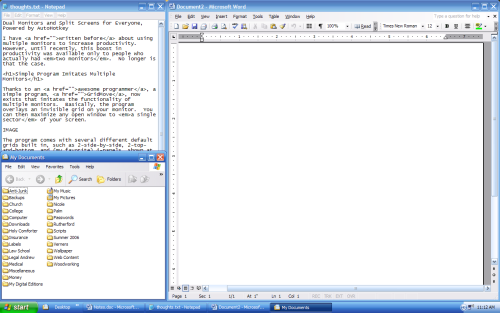
Thanks to an awesome programmer, a simple program, GridMove, now exists that imitates the functionality of multiple monitors. Basically, the program overlays an invisible grid on your monitor. You can then maximize any open window to a single sector of your screen.
The program comes with several different default grids built in, such as 2-side-by-side, 2-top-and-bottom, and (my favorite) 4-panels, shown below. Plus, you can construct your own grid, if you desire something different.
Get more legal tips
|
See also... |
What to do with Gmail’s “Star”…
I have long wondered what people actually do with the “star” feature in Gmail. Unless you just like to have things waiting on the back-burner to bite you in the butt, I think it’s always a bad idea to simply flag an email to do later and leave it in your inbox.
Personally, I use Outlook for my emails needs (but I use Gmail when I’m away from home). My emails only have two statuses: read or unread. If an email is read, it is completely done and filed away, only to be needed again for some later reference. An unread email means that I either have truly not read it OR that I am waiting to do something with it. Thus, all my “to do” later things are always still in my inbox, motivating me to get it done and quit having to look at it. Also, all the important emails in Outlook are in the same place: the Search Folder labeled “Unread Mail.” Nothing ever falls between the cracks, since there are really no cracks in this system. But more on that at a later point…
Matt’s Idea Blog posted a great article on using Gmail’s “star” to highlight good news in your life. Some things Matt marks with a “star” in his Gmail account:
Testimonials from happy clients
Support, praise, and encouragement from readers
Feedback on things I’ve done that have helped others
Requests for consulting
Nice introductions from new friends
I can’t say enough how much I LOVE this idea. This makes it quite simple to pull up all the good things that have happened to you in those down days, and you’re also not tempted to use the “star” for something like prioritizing emails.
I think I might start flagging good news emails in Outlook. Maybe I can make them a happy yellow or orange. Then I could setup a simple Search Folder that will find all yellow flags and label the folder “Good News” or “Great Happenings”. What a pick-me-up on a dismal day!
Do you have a novel use for the Gmail “star”? Let us know by leaving a comment or you can drop me a line.
[tags]legal andrew, gmail, email, microsoft outlook, outlook, flag, star[/tags]
Get more legal tips
|
See also... |
New Law Firm Recruiting Tactic: Podcasts
As any person who has looked for jobs at major law firms can attest, the recruiters are always looking for new ways to make their firm stand out. On paper, Firm X looks virtually identical to Firm Y. Likewise, firm websites provide basically the same content, just in a different design.
Recently, LexBlog discovered, the Boston firm of Goulston & Storrs has become what seems to be the first firm to provide information to recruits via downloadable podcasts. A quick look at their listing of available podcasts shows a variety of different topics covered:
Do associates have a meaningful role as part of a team?
If I screw up, does it mean I won’t get an offer?
How do people treat and relate to one another?
Is Goulston & Storrs likely to merge with another firm?
What are you looking for in an associate?
While I have not taken the time to listen to the ‘casts (which vary from 40 seconds to 2 minutes & 12 seconds), this tactic does seem to one-up other law firms. Whether the information is actually useful and meaningful, that must be determined by actual recruits.
One point that keeps in line with the theme here at Legal Andrew is that these ‘casts can be a time-saver. Instead of spending hours researching firms online, you can load these little guys onto your iPod and then listen to them while working out or walking the dog. I guess that would be considered a productivity boost.
I thought it was advanced and techno-savvy for firms to pass out USB thumb drives. Podcasts are taking recruiting to a different level. Maybe another firm will capitalize on both ideas and give away iPods to interviewees, of course preloading them with the firm’s recruitment podcasts.
What do you guys think of this idea? Have you encountered any other over-the-top law firm recruitment techniques? Leave a comment or drop me a line.
[tags]legal andrew, law firm, recruiting, podcast[/tags]
Get more legal tips
|
See also... |
Online Conferencing & Collaboration for Small Firms
I just ran across an interesting online service that allows people to collaborate and conference online. It is called Central Desktop, and it looks like a good option for small law firms or other teams that need to plan projects over distances. From the Web Worker Daily article I read, here is a short synopsis:
Creating wikis or microsites is as easy as selecting a template. Calendars, task lists and other team management tools are just a tab away from your dashboard, where you can manage multiple workspaces, communicate with others and schedule important events.
Has anyone tried out Central Desktop for a legal collaboration solution? Do you have other methods of communicating and collaborating with other attorneys electronically? Please post a comment or drop me a line.
[tags]legal andrew, online, central desktop, collaboration, conference[/tags]
Get more legal tips
|
See also... |
Assess Your Legal Backup Solution
It continually amazes me how many computer users, especially in the legal community, do not take the appropriate efforts to backup their data. It seems that almost every week at the law school someone’s hard drive crashes, and–lo and behold–they did not backup their data (or their latest backup is two months old).
To be fair, I also used to be in this camp. I burned my files to CD every few months, thinking that I was safeguarding my valuable information. Nothing could be further from the truth.
This article will outline the key steps in having a reliable backup system. By its end, you should have the tools and knowledge necessary to protect your valuable data, whether that is class notes or client information.
What Do You Need?
The primary components of a backup system are simple. Moreover, you can obtain everything for FREE. Here is what you need:
- Data to backup
- Location to store backup
- Backup software
Get more legal tips
|
See also... |
Good Lifehack for Law Students and Lawyers: Mega Mini Challenge
 Comments Off on Good Lifehack for Law Students and Lawyers: Mega Mini Challenge
 As a law student, one of the things that can be terribly hard to do is motivate yourself to do things, especially reading for class (and especially when you are a third year!). It is just quite simply difficult to push yourself to get things done when there is no real deadline or the deadline is weeks away (like a looming final exam).
I’m sure everyone else (especially lawyers) faces this similar challenge. That is why I really like the “Mega Mini Challenge” idea from Lifehack.org‘s interview with Andy Mitchell:
I am most likely to procrastinate when there is no pressure; and for me, there can be no pressure unless there is a deadline in a few hours.
Therefore, mundane daily events have to become deadlines. Lunch cannot be taken until X is done. The call of nature cannot be answered until Y is satisfied. It certainly sparks focus, not to mention weight loss and exemplary bladder control…
What could be more simple? I love using this technique. The only problem for me is that I sometimes push myself too far and will not get up from my desk to get water or something else that is very important. As with all things, moderation is the key.
How do you get yourself motivated when there is no pressure? Leave a comment or drop me a line to let us know.
[tags]legal andrew, lifehack, law student, lawyer, attorney, mega mini, lifehack.org[/tags]
Get more legal tips
|
See also... |
Improvements to the Blog
I really should apologize for my infrequent posting over the summer. It was a crazy few months, but that’s all behind us now.
I have taken the past few days to make some minor improvements to the blog here. I hope they make the site more user-friendly and help you more quickly access the content you want. Of note, I have now standardized the sidebars, providing recent comments & posts, as well as the most popular posts on the left side. Also, you will notice a new page entitled “Scripts and Bits” where I plan to post scripts and other code tidbits that should help out with your legal techology needs.
Finally, I have been preparing some great content and coming up with new ideas to help make Legal Andrew be more useful than ever. I urge you to keep track of my feed in your favorite reader and to check back regularly, as this blog should be taking off soon.
Happy reading, and, as always, please feel free to drop me a line or post a comment if you have any questions or thoughts.
Get more legal tips
|
See also... |
Ways to Stay Focused at Work / School
I just found a great post on Dave Cheong’s blog entitled “18 Ways to Stay Focused at Work.” Not to be let down, the post definitely delivers on its promise. Here are two of my favorite tips that Dave offers:
Write out a daily task list and plan your day. There’s nothing like a task list sitting next to you to keep you focused. When you have a list of the things you need to accomplish in a day, having that close to you constantly reminding you of what needs to be done is a great way of keeping on track.
Listen to the right types of music. Music is a great way of settling into the working routine. In addition, having music can drown out office noises like printers and background chattering. Be careful though, depending on personal preference, some types of music are not particularly conducive to productive work. For me, I can’t work when listening to songs with lots of lyrics because the words interrupt my thinking process.
Whether you are at work or at school, these two tips are incredibly important for getting things done. Having a list of things to get done can be an incredible motivator. I personally love crossing things off a to-do list. 🙂
Likewise, it is really helpful in a noisy environment to have some music on. However, be sure to have the right type of music playing. For me, this is usually instrumental music. Like Dave, I can’t concentrate with music that has many lyrics playing in the background. Also, I have found that some good noise-isolating earphones are important sometimes.
Do you have any tips to help stay focused at work or school? Leave a comment for us or drop me a line.
[tags]legal andrew, focus, work, law school[/tags]
Get more legal tips
|
See also... |
-
Legal tips by email
Sign-up below to get email tips and exclusive discounts on videos, webinars, and future items.
All fields are required.
-
Receive updates
By email
By rss (full feed)
-
About Andrew Flusche
Lawyer, bicyclist, husband.
More about me...
Tumble Log


-
Popular Posts