
Note Taking in Word: A Tale of Two Methods

As classes get into full swing, I thought it would be a good time to look at two different methods of taking notes in Microsoft Word. The classic problem is how to take reading notes as well as class notes, keeping both sets of notes organized and accessible.
Side by Side
The first method involves using two separate Word files, one for each set of notes (reading v. lecture). Simply take notes in a Word document while reading, and then use another Word document for taking notes during class. You can label each set of notes with the date for the assignments, and in this way you can keep your reading notes aligned with your class notes.
Click to continue reading
Get more legal tips
|
See also... |
Bypass Westlaw’s Annoying Mini-Window
|
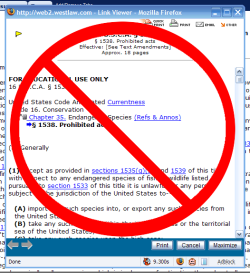
Anyone who has used Westlaw for online research has experienced the annoying mini-window that pops up when you click a link from within a case or statute. As Westlaw itself terms it, it is the “Link Viewer.” More aptly, the window is the “Research Annoyance.” Here is a quick and simple method of bypassing this window completely, allowing you to open links within cases in a regular new browser window (or tab).
Before you can use this easy trick, you must have two pieces of software installed on your computer: Firefox and the Greasemonkey extension. These tools form the basis for this quick fix. If you have never used Firefox, you definitely should check it out. It is much more secure and customizable than any other browser out there. Greasemonkey is an add-on for Firefox that lets you run user-written scripts, like the one I’m about to give you. 🙂
Click to continue reading
Get more legal tips
|
See also... |
Even Attorneys Can Save Money!
There is a great article at Lifehack.org about saving money. Instead of giving the standard tips like budgeting, etc, this article provides concrete ways to trim your expenses but still have a good life.
My favorite two happen to be the first two in the list: make your own coffee and use your local library. In our day of getting it fast and right at our fingertips, it is easy to forget that so many things are easily accessible and cheaper to do ourselves. Instead of getting your $3.50 cup of Starbucks coffee, try making your own coffee at home. Also, instead of buying a book, reading it once, and stashing it on your pile in the corner, try checking it out from your local library.
Even attorneys can use these simple methods to save some cash. While it might be easier to hit Starbucks when you get to the office, think about the time you spend standing in line for that $3.50 shot of caffeine. You could have your home coffee maker automatically ready when you are heading out the door, pour your cup, and take off. Plus, this way you can get your caffeine started on the way to work!
What other ways do you guys know to save a few dollars here and there? Leave a comment, or drop me a line.
[tags]legal andrew, attorney, lawyer, law student, save money, cash[/tags]
Get more legal tips
|
See also... |
Part-Time Attorneys
One of the questions plagued by everyone in the legal sphere is the idea of having part-time attorneys. This issue seems to be getting more attention lately due to the number of working female attorneys who have children. It seems like most firms are willing to give maternity leave for their attorneys, but I wonder how many are willing to allow part-time arrangements thereafter.
As this article from Trial Ad Notes mentions, the Nassau County (New York) District Attorney’s Office now refuses to allow anyone to work part-time. It seems that the women’s groups have taken the DA to task, unsuccessfully.
As a male, one thing I think people don’t think about often is the other side of the issue: paternity leave. I hope to have a family soon, and it would be great to be able to take off for a month or two and help my wife around the time our children are born. Also, it might be needed someday to work less than a full-time attorney, such as if we were to have special needs children. I wonder how many law firms or other legal employers would be accepting of such an arrangement for a man, not to mention women.
[tags]legal andrew, atorney, lawyer, law firm, part-time[/tags]
Get more legal tips
|
See also... |
Flat Fees or Hourly Billing: What is More Efficient?
As usual in the law community, there is a discussion regarding whether attorneys should bill clients by the project or by time. My Shingle has a good point to add to the discussion: who bears the cost of overage if the project costs more than expected? I completely agree with the article’s main point:
When I give a flat fee estimate, I will eat the cost unless the extra work is caused by the client (e.g., client lies about material issues in the case) or created by unforseen events (e.g., change in a 50 year precedent that leads to multiple appeals). My feeling is that as the attorney, I am the expert on estimating fees, so I should bear the risk of an inaccurate estimate.
But Which is More Efficient?
My question here is which method of billing is more efficient. To me, it all comes down to which method costs more time to administer. If an attorney does a certain task a lot and can quickly and accurately determine a flat fee to charge, that would be the more efficient billing method. However, if the attorney does not do a task very often and would have to take a lot of time to estimate the cost, hourly billing would probably work better.
Thus, I think that efficiency lies in the hands of attorneys. We must know what we can do in a specified amount of time. This helps clients get the best value for their money. And that’s what attorneys should be doing: providing the best services possible to their clients for the most appropriate price.
[tags]legal andrew, billing, law firm, attorney, lawyer, flat fee, hourly[/tags]
Get more legal tips
|
See also... |
Excel in Spreadsheets with these Excel Tips
This list of a few tips for Microsoft Excel should help you manipulate those legal spreadsheets with ease. My favorite one:
Press Alt + Enter to force a new line in a cell.
I don’t know about you guys, but this new line tip has come in handy many times for me.
[tags]legal andrew, excel, microsoft excel, spreadsheet, new line[/tags]
Get more legal tips
|
See also... |
Practicing Law Is Customer Service
I just read an article at Lifehack.org that really made me think about the nature of practicing law. The idea behind the article is that customers are serviced better and happier when you slow down and give them your undivided time. Anyone remotely close to being a lawyer realizes that the practice of law is all about servicing clients (aka: customers). Thus, it stands to reason that lawyers should slow down and give each client their undivided attention. As the article explains:
Customers prefer to deal with people and organizations that treat them well and make them feel important. They judge value by how well their needs are met and any problems they have are solved, fully and permanently. They aren’t interested in your sales quota or the pressures you face to make your budget. As far as each customer is concerned, they are the only one, and that’s how they expect, deep down, to be treated.
This is probably all self-explanatory for a lawyer who has been practicing for any length of time. However, it is probably always useful to come back and think about these basic concepts. Also, it is important for summer associates and new lawyers to think with this mindset of servicing customers.
[tags]legal andrew, law firm, client, customer[/tags]
Get more legal tips
|
See also... |
Outlook Tasks Are a Lawyer’s Best Friend
Of all the busy lawyers that I am working with this summer, I do not think many (if any) of them utilize one of the powerful tools available in their computer arsenal: Outlook tasks. As a mere law student (and husband), I live out of my taskpad. Everything that I have to do (or am waiting for someone else to do) resides there. In my opinion, Outlook tasks are critical to organization and knowing what needs to be done. If you’re not familiar with tasks, this article will give you a quick primer and show you some of the cool benefits to using them.
Intro to the Taskpad
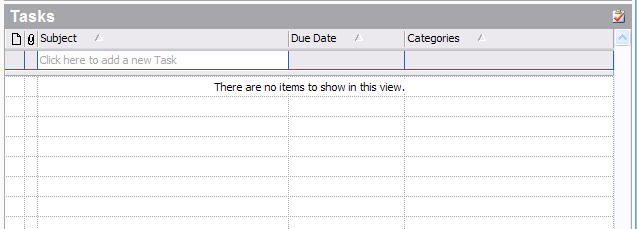
If you are using Outlook 2003, all you need to do is click on “Tasks” in your left pane or folder list. The taskpad should display in your right pane. Or, if keyboard shortcuts are your thing, hit CTRL + 4. Your screen should show something similar to this:
Get more legal tips
|
See also... |
Blogging Interns Beware
I ran across this interesting article from the New York Times today [via LexBlog Blog]. It covers the sensitive subject of interns blogging about the internal workings of their companies. The difficult issue seems to be this:
Most experienced employees know: Thou Shalt Not Blab About the Company’s Internal Business. But the line between what is public and what is private is increasingly fuzzy for young people comfortable with broadcasting nearly every aspect of their lives on the Web, posting pictures of their grandmother at graduation next to one of them eating whipped cream off a woman’s belly. For them, shifting from a like-minded audience of peers to an intergenerational, hierarchical workplace can be jarring.
This is an issue that I have been thinking a lot about as I have been working at my firm this summer. You may have noticed that my posting has drastically slowed down over the past few weeks. In part, this has been due to my lack of time; however, it is also due to my hesitancy regarding what to post and what not to post.
I do not want to risk becoming one of the people who are fired over their blog, but at the same time, I am fairly passionate about increasing my productivity using technology, and I want to share my ideas with others. I will continue to work on that balance, while definitely erring on the side of caution. However, I am determined to boost my post-rate and beef up this blog. Hopefully I can meet all these goals.
[tags]legal andrew, blog, intern[/tags]
Get more legal tips
|
See also... |
Podcasts During Commutes
I personally think podcasts are one of the greatest things since sliced bread. For the past few weeks (since I got my iPod), I have been downloading audio news in the morning and afternoon for my commutes to and from law school. I found this to be a great way to use my time on the bus to catch up with news, thus killing two birds with one stone.
However, now that I am at my internship for the summer, I can’t download my news as easily. I am not supposed to install programs on my computer at the firm, so I can’t download my podcasts there. And I do not use my computer every night where we are living, so I can’t depend upon downloading them in the mornings or evenings.
I have to wonder if anyone is in a similar situation. I wish my iPod could connect wirelessly and update its podcasts, thus removing the need for a computer. That would rock. But then it would not have cost so little (it’s a 1 GB Nano, by the way).
For a great intro on podcasts, and why you should listen, check out Knowledge Hack: Consume Podcasts (Lifehacker.com).
Do you have any solutions for the downloading dilemma? Leave a comment or drop me a line.
[tags]legal andrew, podcast, commute[/tags]
Get more legal tips
|
See also... |
-
Legal tips by email
Sign-up below to get email tips and exclusive discounts on videos, webinars, and future items.
All fields are required.
-
Receive updates
By email
By rss (full feed)
-
About Andrew Flusche
Lawyer, bicyclist, husband.
More about me...
Tumble Log


-
Popular Posts