
Hide PayPerPost Opportunities That You Don’t Want
![]() |
I haven’t hidden the fact that I do paid posts from time to time. Yes, I even take opportunities from PayPerPost.
There are usually anywhere from 60 to 100+ opportunities in the PayPerPost database. Since they’ve segmented their bloggers by PageRank and category, I’m not eligible for all opportunities. Plus, most of them have nothing to do with the site here.
I want to hide opportunities that aren’t applicable to me.
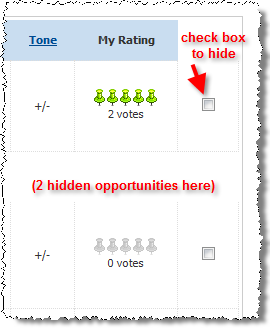
That’s why I created a simple Firefox extension that allows users to hide PayPerPost opportunities. It adds a small checkbox next to each opportunity. When you check the box, the opportunity forever disappears from your list. Handy, right? Above I have posted a screen shot of it in action.
This extension is in an early beta stage. I’ve used it with great success for several weeks. I hope it works equally well for you, and I welcome all feedback and suggestions.
Install PayPerPost Opps Hider If you get a message saying that you can’t install the extension, you’ll need to “Allow” installation from my domain (LegalAndrew.com).
Please let me know what you think of this extension. If you like it, please consider supporting further development by referring other people to the blog, linking to the blog, or making a donation. Your comments and questions are always welcome.
Also, I welcome your feedback in the Firefox Add-ons Sandbox (direct link to extension). With some good community feedback, hopefully the extension can make it to the public add-ons directory. You’ll have to register with Mozilla, but it’s free.
[tags]payperpost, firefox, extension, payperpostopps[/tags]
Popularity: 3% [?]
Get more legal tips
|
See also... |
Comments
40 Responses to “Hide PayPerPost Opportunities That You Don’t Want”


March 28th, 2007
Great plugin! Thanks for that! You’ve really filled a gap!
March 28th, 2007
Owen,
I’m glad you like the extension. I’m hoping to develop it further, so any requests / suggestions are welcome.
Take care,
Andrew
March 28th, 2007
This is very nicely done. I’d just like to see the ability to unhide.
March 29th, 2007
Amy,
I plan to work on the “unhide” feature this weekend. Hopefully I’ll get an updated version ready by next week. I’m glad you like the concept.
Thanks for commenting,
Andrew
April 11th, 2007
Hi Andrew,
just a suggestion. I get errors sometimes with the plugin, particularly when the page fails to load correctly. In the section:
// Get the main table body
var tables, thisTable;
tables = document.getElementsByTagName(’tbody’);
thisTable = tables[1];
You might want to validate that thisTable contains valid data before proceeding.
April 11th, 2007
Hey Owen,
Thanks for your feedback here. I’ll definitely put this on the list for improvements. I still need to add the “unhide” feature, so I’ll make this error checking as part of the next version.
Stay tuned for the updated extension.
Andrew
April 14th, 2007
I borrowed your png, but then I blogged about your plugin. I do believe it really helps us segment our blog, too!
Great plugin! Check out my brief intro on InvestorBlogger
April 14th, 2007
[...] By kennethdickson LegalAndrews website has a very useful plugin (for Firefox only) called PayperpostOpps that enables PPP bloggers to hide opps that they don’t want to see, such as opps that are not [...]
April 15th, 2007
Kenneth,
I’m glad you like the plugin. That’s great! I hope other people can get some beneficial use out of it.
April 16th, 2007
[...] with that plugin called payperpostopps, I can nuke them all, and focus on what IS available. So here is what is available on page 1 for me [...]
May 5th, 2007
[...] PayperpostOpps: for Payperpost Opps. [...]
May 26th, 2007
This is awesome. I finally got around to downloading it and I love it!!!!
May 26th, 2007
Hi Lisa,
I’m glad that you like the extension. I plan to release a much-needed version 2 very soon.
Congrats on the baby. Only another month, right?
Andrew
June 6th, 2007
[...] Posties, do you want to make viewing the PayPerPost opps board more convenient? If you do, go directly to LegalAndrew.com and install his FireFox extension to hide PPP opps you don’t want to see. [...]
June 12th, 2007
A lovely extension I must say, though I was hoping for a Greasemonkey script as they tend to be easier to modify/control, thanks a load for your work nonetheless!
June 12th, 2007
I’ll definitely release a Greasemonkey script with the next version.
Thanks for commenting,
Andrew
June 12th, 2007
You’re my here Andrew, you’ve done a wonderful job
June 14th, 2007
I really want this plug in!! When I try to get it, I’m told I don’t have access. I am logged in at Mozilla.
June 15th, 2007
Hi Daethian,
I’m sorry that you’re having trouble with the download. Can you take a screenshot of what you’re seeing and email it to me (aflusche@gmail.com)? That would help me better understand the problem.
Thanks,
Andrew
June 15th, 2007
Hi Andrew… I was trying the direct link last night. Today I tried the download link and it worked fine. Sorry about that! I have been wanting this exact thing for so long!!
June 15th, 2007
Awesome! I’m sorry it gave you trouble, but I’m glad you got it downloaded.
June 18th, 2007
I been waiting for PayPerPost to create an algorithm that will only show qualify and open post. Its annoying to see all those reserves. Thank you for this plugin it’s the best choice for getting rid of those annoying jobs that I can’t take.
Make Money Online with Knighty Night’s Talk
June 20th, 2007
I might test Payperposts, but I hate when a website asks me about my social security number.
June 20th, 2007
Well prepagate, I don’t even have one (living in the Netherlands), so I doubt it’ll be much of an issue if you leave that field out…
June 20th, 2007
Hey prepagate, I signed up with PayPerPost and I lived in the US. I haven’t given them my social security number yet, but they still payout to me. I’m guessing when they will pay me up to $600 and give me a notice to provide social security if I still want to get paid for this year.
July 2nd, 2007
This is a great plug in! I love it. I got so tired of looking at opportunities that I couldn’t do because I’m not in the right country. Thanks! It look so clean now.
July 5th, 2007
Yeah, i love it! Thank you very much! It helps me a lot!
August 7th, 2007
This add on does not work that good anymore. It removed some Opps that were added. Can you check in on the problem. Thanks.
August 7th, 2007
Michael – Can you provide any more details about the precise problem? I did a little checking, and everything looks fine on my end. Did you add a new Firefox extension? Perhaps something is conflicting with this one.
August 7th, 2007
I just installed the StumbleUpon and Google Toolbar and your extension. Here is a picture, but it probably doesn’t help. Don’t get me wrong because I think you have a fantastic tool here.
I did a post at my blog about it. Might help you out, but the picture doesn’t really say its not working properly because people can say I probably accidently removed those opps and forgot.
Make Less Money?
It be great if you can figure out what the problem is.
August 18th, 2007
good extension. I have a question: payperpost payments are good?
August 18th, 2007
aspirante – PPP pays through PayPal 30 days after your post goes up. They always pay on time and everything works great!
Andrew
August 20th, 2007
[...] plugin that will allow me to block those ads (not the advertiser, just the ad…) Isn’t That cool?? Tag cloudAside firefox PayPerPost plugin [?] Share [...]
January 31st, 2008
Andrew… did you ever get around to making the “UN-HIDE” version you talked about last year?
I would also like to know how to uninstall this… what steps would you suggest?
Thanks!
February 2nd, 2008
meritt – Actually, I stopped development on this extension. I don’t do PayPerPost any longer, so I just don’t have the time to work on this extension. Sorry.
February 4th, 2008
Thanks for answering!
May 3rd, 2008
[...] PayPerPost Opps Hider lets you hide PayPerPost opportunities you don’t want i.e. low paying ads or types of ads you deem inappropriate for you blog. I have not tried this but bloggers I know that do Paperpost use it and like it. [...]
January 27th, 2009
After some problems I was able to download it. Didn’t recognize that I have to “allow” it! Thank you!
May 21st, 2009
[...] I segmented my opps this way! Now with that plugin called payperpostopps, I can nuke them all, and focus on what IS available. So here is what is available on page 1 for me [...]
May 21st, 2009
[...] PayperpostOpps: for Payperpost Opps. [...]