
Use Google Desktop’s Scratch Pad for GTD Inbox
 |
Do you struggle with implementing GTD (“getting things done“)? Do you have a digital “inbox” where you can throw all your notes and thoughts for later processing? Install Google Desktop and you’ll be set.
The Scratch Pad
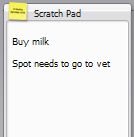
One of the default “gadgets” that comes pre-installed with Google Desktop is a nifty Scratch Pad. Think of it like a handy post-it note always at the ready on your monitor. You can quickly type anything in there, and it is always saved for later.
One of the problems with the Scratch Pad is that it can become a receptacle for junk. If you type too much in there, it will likely become overwhelming to even look at.
Into the inbox
To fix this problem, think of your Scratch Pad as a digital inbox. Any time someone comes up and tells you something, you get a phone call, you remember something to do later, stick it in the Scratch Pad.
Since the Scratch Pad automatically saves, you never have to worry about losing this virtual post-it note. You can just throw stuff in and trust that it will be there late.
Empty daily
The key to utilizing the Scratch Pad effectively is to empty it out every day. The space is small, so a few notes will quickly clutter it and make it unusable. Emptying it daily will ensure that you have fresh, clean space for the next day’s notes.
The other benefit of emptying daily is that you faithfully process things and put them where they need to be. Does it need to go on a task list? Is it a note to be filed away? Process it, and put it where it belongs in your GTD system.
Do you use the Scratch Pad? How does it fit into your productivity system? Please post a comment or drop me a line.
[tags]legal andrew, google desktop, scratch pad, gtd[/tags]
Get more legal tips
|
See also... |
Comments
4 Responses to “Use Google Desktop’s Scratch Pad for GTD Inbox”
January 19th, 2007